

Before a new data center becomes fully operational, there is an important question that needs to be answered:
Can the power, airflow, and cooling systems handle the thermal load when all servers are running at full capacity?
The challenge is that during the construction and commissioning stages, the actual IT equipment may not yet be fully installed.
So, how can engineers simulate the heat generated by servers before the servers arrive?
The answer is a device that looks much like a server but contains no CPU, memory, or hard drive:
Server Rack Load Bank.
A server rack load bank can be installed in a standard IT rack to simulate the electrical load of IT equipment. It converts electrical energy into heat while using integrated fans to simulate the airflow generated by operating servers.
In simple terms, it can be thought of as a “fake server” for data center testing.
Its purpose is not to replace real servers, but to allow engineering teams to test the data center’s power, heat generation, airflow, and cooling performance before the actual IT equipment is deployed.
Why Do Servers Affect Data Center Temperature?
From a thermal management perspective, a server can essentially be viewed as a continuously operating heat-generating device.
Most of the electrical power consumed by a server is ultimately converted into heat and released into the data center environment.
For example:
10 kW IT Load ≈ 10 kW Thermal Load
If a rack contains 20 servers, with each server consuming an average of 1.5 kW, the rack could generate approximately:
20 × 1.5 kW = 30 kW
of IT thermal load.
This means the data center cooling system must do more than simply provide sufficient cooling capacity. It must also deliver cool air effectively to the server inlet side and remove the hot air discharged by the servers.
Therefore, data center thermal testing is not simply about asking:
“Is the air conditioning system cold enough?”
The real question is how the entire system performs:
Electrical Load → Heat Generation → Airflow → Cooling → Temperature
What Is Data Center Thermal Testing?
Data Center Thermal Testing is the process of using controlled electrical and thermal loads to simulate actual IT equipment operation and verify the performance of the data center’s cooling system, airflow management, and temperature control.
During data center commissioning, artificial electrical and thermal loads can be used to test power and cooling infrastructure before the actual IT equipment is fully deployed.
Industry guidance from organizations such as ASHRAE also recognizes the use of resistive load banks or server simulators with dimensions similar to IT equipment to simulate the power and heat generated by servers and to help reproduce airflow conditions within IT racks.
As a result, typical data center thermal testing focuses on several key parameters:
- Cooling Capacity — The available cooling capacity of the facility
- Airflow Distribution — How effectively air is distributed throughout the data hall
- Rack Inlet Temperature — The temperature of air entering the IT equipment
- Rack Exhaust Temperature — The temperature of air discharged from the rack
- HVAC Response — How the cooling system responds to changes in IT load
- Hot Spot Detection — Identification of localized areas with excessive temperatures
This is why simply checking the rated cooling capacity of an HVAC system does not necessarily represent its actual thermal performance in a live data center environment.
What Are Hot Aisle and Cold Aisle?
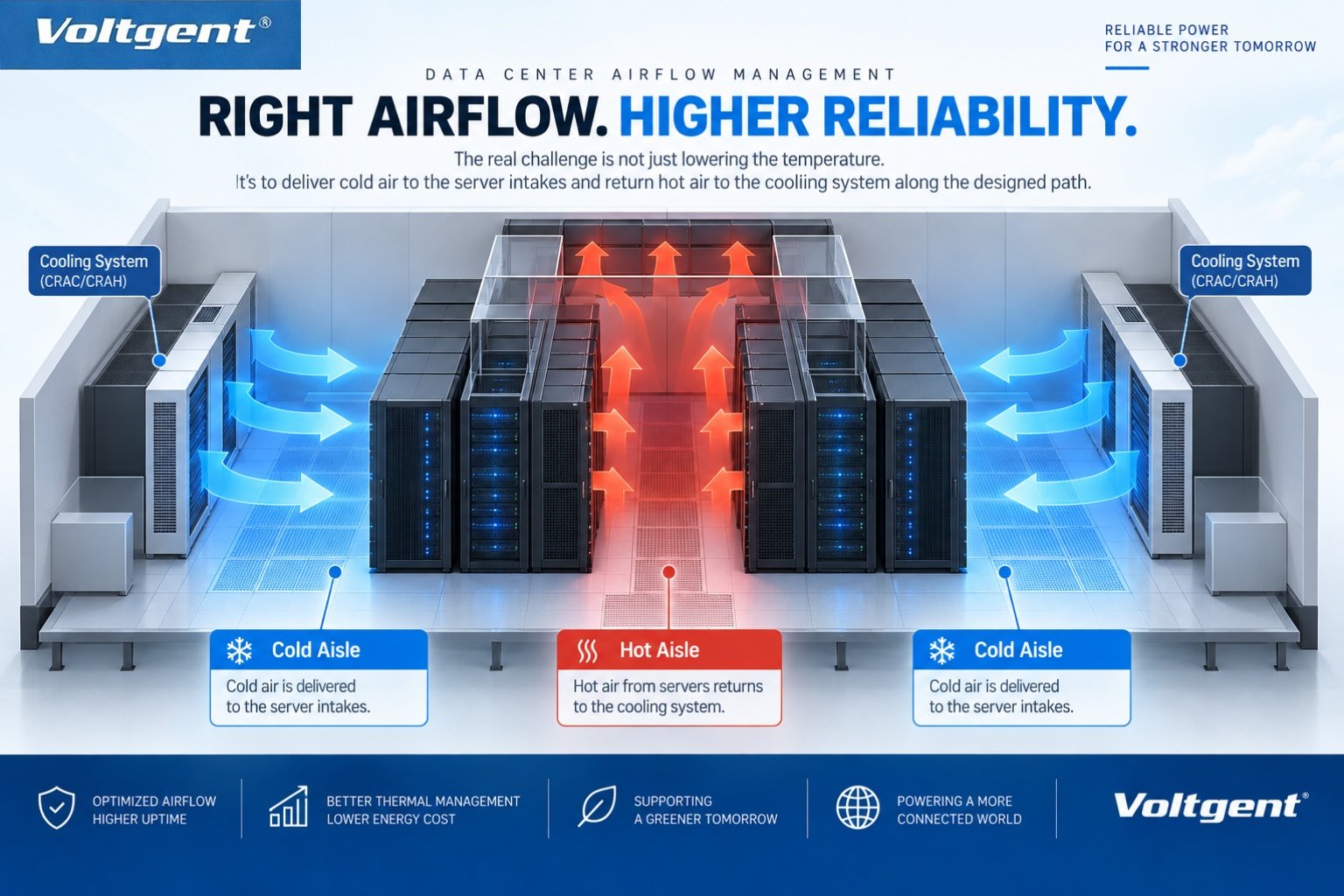
To understand data center thermal testing, it is important to understand the concept of Hot Aisle / Cold Aisle containment and airflow management.
Servers typically draw cool air through the front of the rack, pass the air across internal components, and discharge hot air from the rear.
For this reason, server racks are normally arranged in alternating rows:
Cold Aisle
The front sides of the server racks face each other.
This is where cool supply air is delivered and drawn into the servers.
Hot Aisle
The rear sides of the server racks face each other.
Hot air discharged from the servers collects in this area before being returned to the cooling system.
The basic airflow path can be represented as:
Cold Aisle → Server → Hot Aisle → Cooling System
The primary purpose of this arrangement is to minimize unnecessary mixing between supply air and exhaust air.
If airflow management is poor, some racks may experience localized temperature increases even when the HVAC system has sufficient overall cooling capacity.
Therefore:
Data center thermal testing is not only about measuring cooling capacity. It is also about understanding how heat moves through the data center.
How Can Server Heat Be Simulated Before Servers Are Installed?
The answer is:
Server Rack Load Bank.
Traditional load banks are primarily used to apply controlled electrical loads to generators, UPS systems, and other power equipment.
A rack load bank is specifically designed for applications where the load needs to be introduced directly into an IT rack environment.
It can be installed in a standard 19-inch rack and uses resistive elements to consume electrical power and convert it primarily into heat.
For example:
30 kW Rack Load Bank
When operating at a 30 kW load, the unit can provide approximately 30 kW of artificial IT thermal load to the data center.
When combined with airflow simulation, it can more closely reproduce the operating conditions of real servers:
Electrical Power
↓
Heat Generation
↓
Airflow Simulation
↓
Hot Air Exhaust
↓
HVAC Cooling
This is the basic principle behind server heat simulation.
Why Not Use Real Servers for Testing?
Real servers can obviously generate realistic IT loads. However, during data center construction and commissioning, the actual IT equipment may not yet be fully installed.
If the engineering team waits until all servers are installed before identifying problems such as:
- Insufficient airflow in certain areas
- Excessive rack temperatures
- Hot air recirculation
- Poor HVAC response
the cost and complexity of corrective measures can be significantly higher.
A Server Rack Load Bank provides a controlled, repeatable, and adjustable artificial IT load that can be introduced before the actual IT equipment arrives.
For example, the test load can be increased progressively:
10 kW → 20 kW → 30 kW → 40 kW
At each load level, engineers can monitor:
- Rack inlet temperature
- Rack exhaust temperature
- Hot aisle temperature
- Cold aisle temperature
- Airflow conditions
- HVAC response
- Electrical system performance
This allows the facility team to evaluate the interaction between the electrical infrastructure and thermal management system before live IT equipment is deployed.
What Does a Rack Load Bank Test in a Data Center?
A complete data center thermal load test does not simply measure temperature. It evaluates the performance of the infrastructure from several different perspectives.
- Electrical Load
The first step is to verify that the required IT load can be applied according to the test plan.
This can help evaluate:
- UPS
- PDU
- Switchgear
- Power Distribution Systems
- Branch Circuits
- Thermal Load
The electrical energy consumed by the load bank is converted into heat, allowing engineers to simulate:
- Server Heat
- Rack Heat Load
- IT Load Density
For example:
20 kW Electrical Load → Approximately 20 kW Thermal Load
- Airflow
Once the thermal load is generated, the next question is how effectively the heat moves through the data center.
Key considerations include:
- Does cool air reach the rack inlet?
- Is hot air effectively removed?
- Does heat accumulate in the hot aisle?
- Is there significant temperature variation within the cold aisle?
- Is hot air recirculating toward the server inlet?
- HVAC Response
When the IT load increases from:
20 kW → 40 kW
can the cooling system respond quickly and maintain stable operating conditions?
Engineers may monitor:
- Supply Air Temperature
- Return Air Temperature
- Cooling Capacity
- Fan Response
- Temperature Stability
Therefore, a complete thermal test essentially evaluates the interaction between:
Electrical Load + Thermal Load + Airflow + HVAC Response
Why Does a Rack Load Bank Need to “Look Like a Server”?
A conventional load bank has one primary function:
Provide an electrical load.
A data center rack load bank has an additional requirement:
The load must generate and discharge heat in a way that represents the thermal behavior of IT equipment within the rack environment.
For this reason, a suitable Server Rack Load Bank should consider more than its electrical rating.
Rack Form Factor
The load bank should be compatible with standard 19-inch IT racks and the available rack space.
Adjustable Load
The electrical load should be adjustable according to the testing requirements.
Load Step Control
The system should allow engineers to test different load levels, for example:
10 kW → 20 kW → 30 kW
Airflow Simulation
Integrated fans can simulate the airflow generated by operating server equipment.
Temperature Monitoring
Temperature measurements can be used to monitor thermal conditions during testing.
Remote / Automatic Control
For large-scale data centers, remote operation, automatic load control, and test data recording can improve testing efficiency and repeatability.
Therefore:
A server rack load bank is more than an electrical resistor. It is a tool for simulating the electrical and thermal behavior of IT equipment during facility testing.
A Typical Data Center Thermal Testing Process
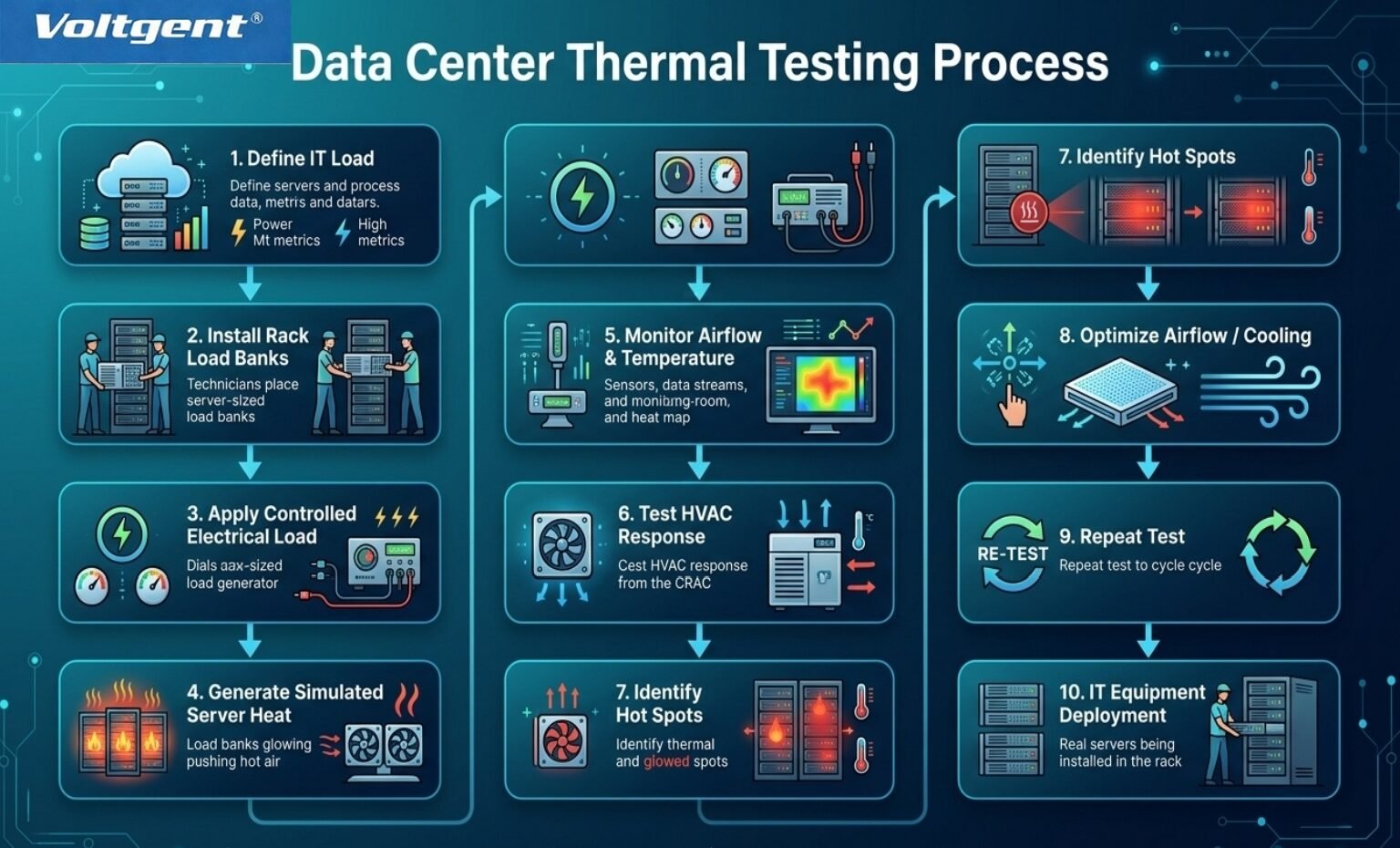
The exact testing procedure should always be developed according to the project’s commissioning plan and testing requirements. However, the basic process can be understood as follows:
Step 1 — Define the IT Load
Determine the electrical and thermal load that needs to be simulated.
↓
Step 2 — Install Rack Load Banks
Install the required load banks in the designated rack positions.
↓
Step 3 — Apply Electrical Load
Apply the electrical load according to the test plan and required load steps.
↓
Step 4 — Generate Simulated Server Heat
Generate a controlled thermal load corresponding to the applied IT load.
↓
Step 5 — Monitor Airflow & Temperature
Record rack inlet temperature, rack exhaust temperature, cold aisle temperature, hot aisle temperature, and other relevant parameters.
↓
Step 6 — Test HVAC Response
Observe how the cooling system responds as the simulated IT load changes.
↓
Step 7 — Identify Hot Spots
Identify localized hot spots, airflow imbalance, and potential hot air recirculation.
↓
Step 8 — Optimize
Adjust airflow management, cooling parameters, or other relevant system settings based on the test results.
↓
Step 9 — Repeat the Test
Repeat the thermal test to verify the effectiveness of the adjustments.
↓
Step 10 — Deploy IT Equipment
Once the infrastructure has been verified against the project’s requirements, the actual IT equipment can be deployed.
What Problems Can Rack Load Banks Identify?
One of the biggest advantages of using a Rack Load Bank for data center thermal testing is the ability to identify potential problems before expensive IT equipment is fully deployed.
Localized High Rack Temperatures
This may indicate insufficient cool air supply or uneven airflow distribution in a particular area.
Uneven Cold Aisle Temperatures
Significant temperature differences between rack locations may indicate an imbalance in supply airflow.
Increasing Hot Aisle Temperatures
Persistent temperature increases in the hot aisle may require investigation of the return-air path, airflow management, or cooling system operation.
Rapid Temperature Increase with Higher IT Load
If temperatures rise rapidly as the simulated IT load increases, the cooling capacity, airflow management, or HVAC control response may require further evaluation.
Hot Air Recirculation
Hot exhaust air returning to the server inlet side is an important airflow management issue because it can expose IT equipment to higher-than-expected inlet temperatures.
Identifying these problems before the actual servers are deployed is generally easier and less disruptive than correcting them after the IT environment is operational.
Rack Load Banks in Data Center Commissioning
This is one of the most important applications for rack load banks.
One of the key objectives of data center commissioning is to systematically test and verify that the building infrastructure, power systems, cooling systems, and controls can operate according to the project’s design requirements.
Artificial loads allow engineering teams to create controlled test conditions even when actual IT equipment has not yet been installed or when the facility has not yet reached its full design IT load.
Therefore:
Data Center Load Banks
are more than simple electrical load-testing equipment.
They provide an important testing link between:
Power
Heat
Airflow
Cooling
during the commissioning process.
VG Load Bank: Rack Load Bank Solutions for Data Center Thermal Testing
For data center applications, selecting a load bank should not be based solely on its rated kW capacity.
The equipment should also match the actual testing environment and project requirements, including:
- Rack Configuration
- Required Load
- Load Step
- Airflow Direction
- Fan Capacity
- Temperature Monitoring
- Control Requirements
- Testing Duration
VG Load Bank provides Rack Load Bank solutions designed around the requirements of data center testing applications, including:
- Data Center Thermal Testing
- Server Heat Simulation
- Data Center Commissioning
- HVAC Testing
- Hot Aisle / Cold Aisle Testing
- UPS Load Testing
- PDU and Power Distribution Testing
- IT Load Simulation
Depending on project requirements, rack load banks can be configured around rack dimensions, load levels, load steps, airflow requirements, and monitoring requirements.
For data center projects that need to validate their infrastructure before the actual servers are deployed, a rack load bank provides a controlled and repeatable method for simulating IT electrical and thermal loads.
Conclusion: Test the Data Center Before the Servers Arrive
A Server Rack Load Bank may look like a row of “fake servers” without CPUs, memory, or hard drives.
But its real purpose is to introduce the electrical load, thermal load, and airflow conditions that the actual servers will eventually create.
This allows engineering teams to verify the data center infrastructure before live IT equipment is deployed.
The complete testing concept can be summarized as:
Power → Load → Heat → Airflow → Cooling
The real purpose of Data Center Thermal Testing is therefore not simply to answer:
“Is the cooling system cold enough?”
It is to answer a much more important question:
“Will this data center be ready when all the real servers arrive and begin operating?”
And a Rack Load Bank is one of the key tools that allows data center teams to answer that question before the servers arrive.